- My model of MX-5 is: __
- I’m based near: __
- I’m looking for technical help or recommendations on: __ change the head unit background image
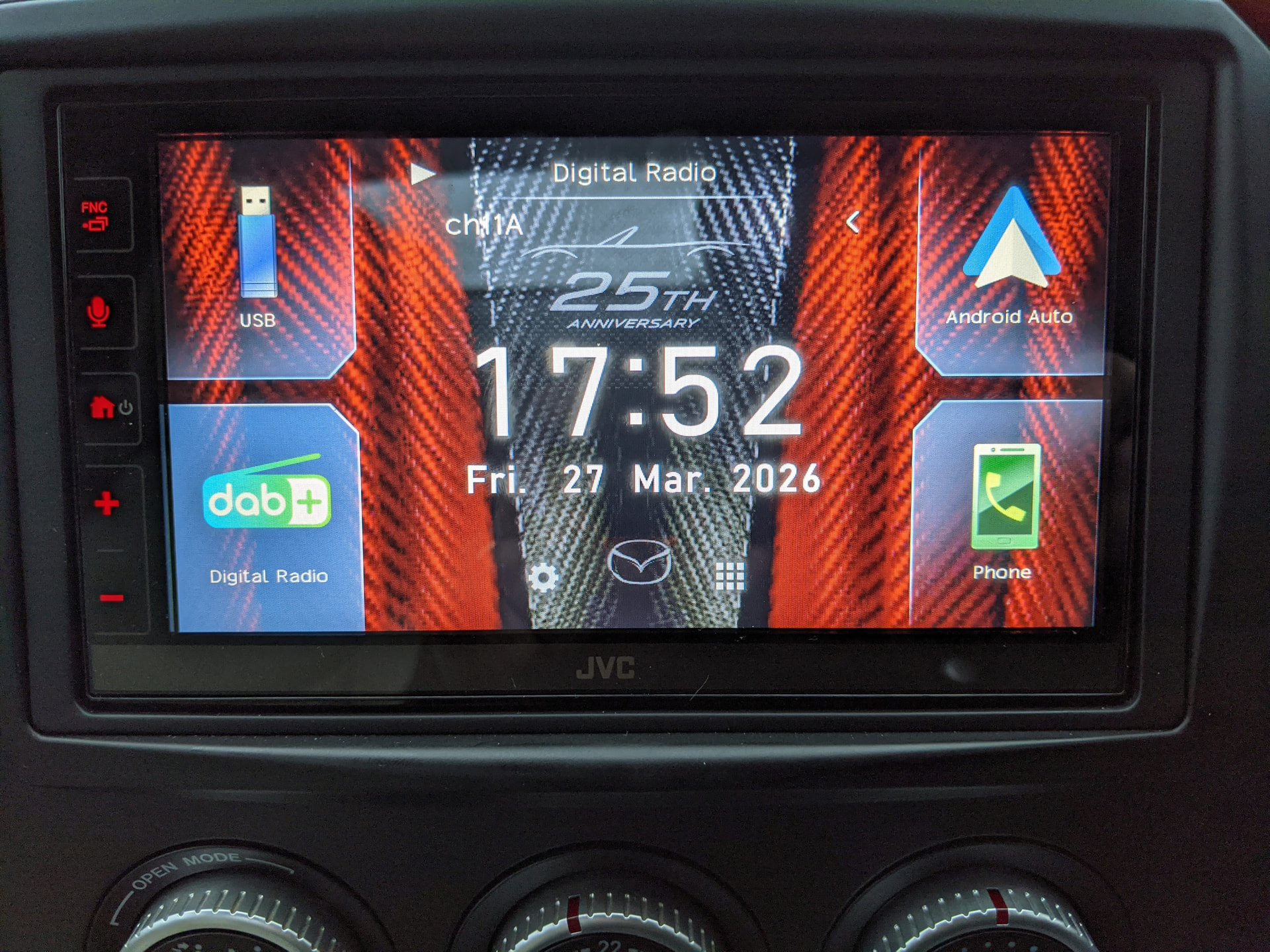
Anyone changed the background image on a JVC or Kenwood head unit?
Got an image on a flash drive but when I go to the settings the ‘gallery’ button is greyed out, so I’m not able to change the unit’s image.
Added a video file and an .MP3 but only the .MP3 is accessible.
If I remember you need a PNG file or convert to one. I’ve previously loaded a a screensaver to a JVC head unit, it was a red Mazda logo wings badge
I have two Kenwood units; a DMX8820DABS and a DMX7722DABS. Both accept JPG files but they must have screen dimension of 800 by 480 pixels. From memory, the 8820 expects the JPG files to be in the BIN directory, whilst the 7722 expects the files to be in the top-level root directory of the SD card.
I can check this tomorrow if it is of any help to you.
The images are 800x480 pixels and I saved various versions (.png .jpeg, .bmp) in 24bit as well as 16 & 32 bit, but none show up.
Also tried a single file on root and various files on root and the same files inside a folder, but still no good.
When I look for the photos in the USB flash, a blue screen appears with “Parking Off” on it.
I’ve also detected an issue with Waze and Google maps on the Android Auto, where I can’t search for an address??? And get a message “Voice only while driving” even though the car is parked.
Could this be because I did not connect a lead to the handbrake switch and maybe these 2 issues are connected?
Later, I’ll get some photos of the screen up here.
Could be the handbrake cable from the head unit, I connected mine up when I fitted the JVC unit.
I believe it’s a light green short cable at the back of the unit, that needs to connect to the handbrake switch.
Do you remember how you made your connection? Did you go directly to the switch that is directly below the handbrake, or is there somewhere else I can tap to?
Yup, it’s the handbrake cable, I have the same issue. I wired mine to the handbrake cable from the harness I got but it doesn’t seem to work, so I need to either wire it directly to the handbrake or ground it somehwere.
It’s not the end of the world since you can always park safely somewhere and use your phone to input text, but not ideal.
I wired it to the handbrake switch cable, cut the cable and spliced a bullet connector in. There isn’t much loose cable to play with though
Thanks all. I’ll get that wire connected and report back.
You’re not wrong there! 
I pulled the white handbrake switch connector and separated the wire&pin from its plastic connector housing, so I could solder the light green wire to it, then refit the wires&pin to the plastic connector housing and it to the switch; but not before dropping the white plastic housing into the transmission tunnel by the handbrake lever!!! 
Very nearly had a disaster on my hands!
I calmly went in the shed, got a length of metal narrow bar, slabbed some grease on it and went “fishing”. It took a few tries, but after dropping it in 3 more times  , it finally came out!
Just changed the background image:
P.s. Android Auto is now working as it should too.
2 Likes