- My model of MX-5 is: __2017 ND
- I’m based near: __north west England
- I’m looking for technical help or recommendations on: __radio replacement
- Good morning, I’m new on here so please bear with me. My 2017 MX-5 radio plays but the display screen is faulty. It continually changes the display and as well as that changing radio stations is hit and miss: sometimes works, sometimes doeasn’t. The satnav works but sometimes I can’t get it to open. The CD player has never worked. I took it to a couple of radio replacement centres but they said that model’s radion can only be replaced by a factory fit whereas other MX-5 models’ radios can be replaced by generic Apple Play kits. Mazda quoted £800 plus labour plus VAT!! Any advice would be much appreciated, thanks.
Welcome 
There’s a few components involved, but from what you’re saying it may be a TAU fault - that’s the tuner and amp unit which is located in the driver’s footwell. So it may be this is at fault, and not actually the CD player or the display unit specifically. I had an audio output issue last year and I needed to replace my TAU.
First of all, I’d look to see if there are any fault codes which will help pinpoint. Take a look here, get into the diagnostic mode and you’ll see any codes logged. Then you can go from there:
So press down the following on the central controller - volume dial + audio button top-left + favourites. Then it’s code 03 to read any fault codes.
Hopefully you’ll see some error codes. Post them up and we’ll go from there 
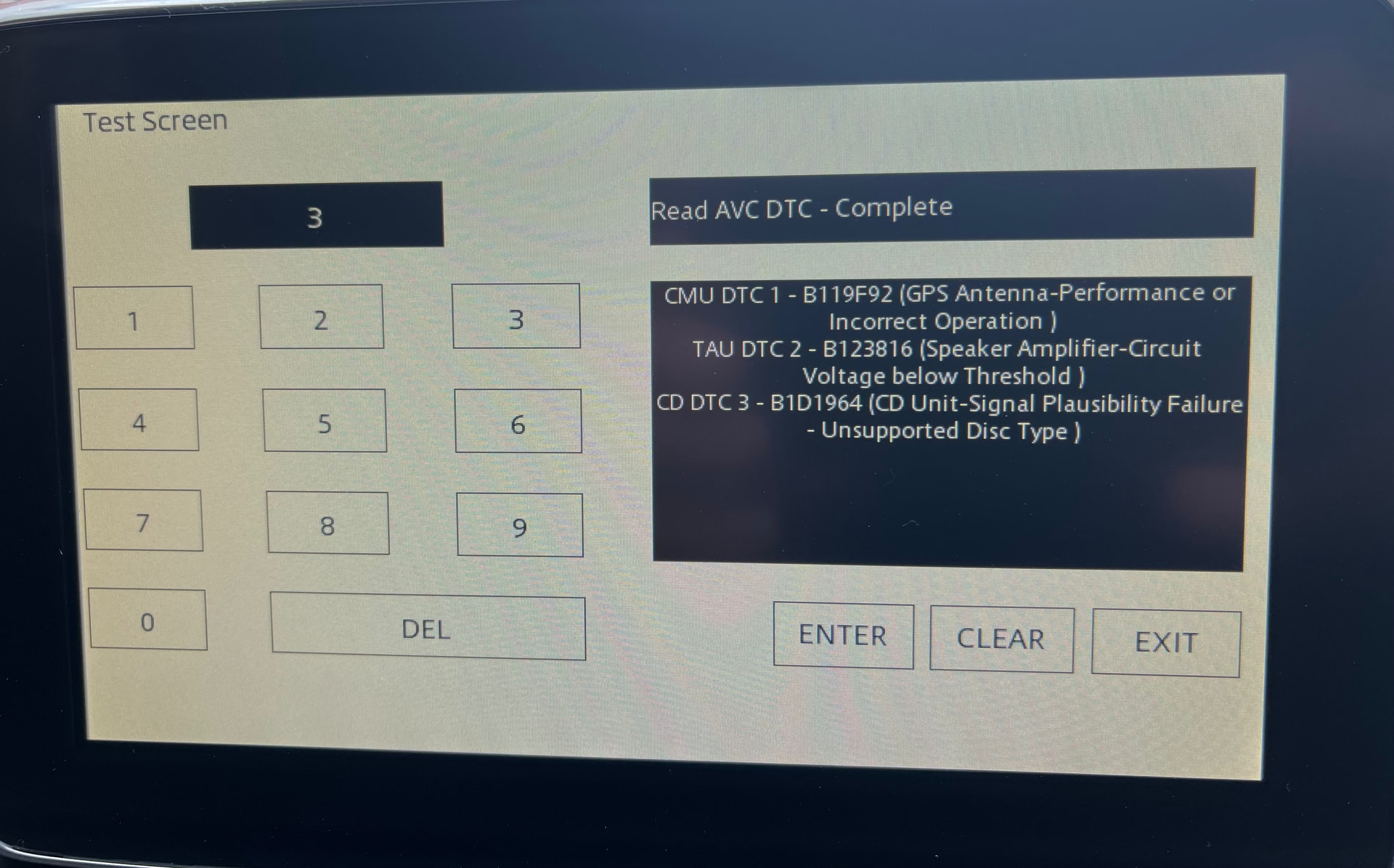
Hi - glad you were able to see some error codes.
First error I’m not familiar with - you could try clearing the error codes and see if that one comes back.
The second error ‘TAU DTC 2’ may point to a 12V battery issue. Do you know how old the car’s battery is? When I was having issues last year, the replacement TAU still didn’t cure one of the issues I was having. I was seeing slightly slower starting as a separate issue, so I replaced the battery as it was nearly 10yrs old on mine anyway. That cured the final issue I was having, so it’s worth considering.
Third error looks to point to an supported disc - if you try another CD, preferably a properly pressed album or similar, and try again.
Thanks Wardy. The battery is only about two years old so I doubt that’s a problem. The CD was a proper one, not a burned copy and I’ve now removed it. I did the test again after that and then I only got the TAU code showing on the display.
I wonder sometimes if prices like that are a veiled signal that they don’t really want the job.