- My model of MX-5 is: __Mk3
- I’m based near: __Dorchester
- I’m looking for technical help or recommendations on: __Sat Nav
I have what I believe is a Alpine INE-W920R sat nav. I just installed the Naviextras toolbox on my laptop, as I want to make updates. The software keeps telling me to connect the sat nav to my laptop, but nowhere can I find instructions how to make this connection. Can someone please help?
From memory, you need to buy a micro SD card and push it into the nav unit (slot on right of unit IIRC) then take that to your computer. Sorry to say, but you’re probably heading into a world of pain with this update. I think that there is something about leaving an SD card in the unit as the latest map is too big to store on the unit’s internal memory.
Hopefully someone who’s done an update will come along and offer some tips.
1 Like
If your computer or laptop doesn’t have an SD card slot,.you can get USB adapters with SD card slots.
Is this your unit in as shown in the sales brochure below?
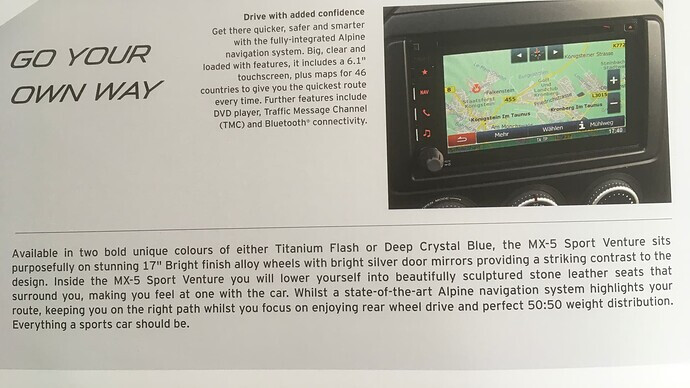
If so, it is the Mazda AVN2 which is a hobbled Alpine INE-W920R. The comments below refer to that.
On the top of the switch panel on the left hand side there is a little release button. Push that and the panel drops down and the unit switches itself off. You’ll then notice that there is a micro-SD card slot with a recessed reset switch (paper-clip operable).
As Robbie says, you’ll need a 32Gb micro-SD card. Don’t go for a higher capacity as the filesystem type will then be exFAT, rather than FAT32 which might be a source of errors later on. Also perform a full format on the card, rather than just a quick format in order to identify and map out any bad blocks.
Once you insert the card into the slot with the Mazda/Alpine NaviExtras G500 software and press OK, there is no going back and that there is a possibility that in copying the map software from your unit onto the external card and performing any updates, you could brick the unit.
One member suggested that an upgrade could be done using a normal USB stick inserted into the port at the back of the interior of the centre arm rest, although I haven’t tried that.
Please have a browse through the links following to weigh up the ratio of risk/reward of going through the update process.
I hope the above (and below) is of some help, Laurie.
https://forum.mx5oc.co.uk/t/alpine-6-1-fitted-to-new-models-buyer-beware/76951
https://forum.mx5oc.co.uk/t/nc-avn2-satnav-comatose-woes/125401
https://www.gpspower.net/alpine/356078-alpine-w920r-sd-card-ready-navigation.html
https://mazda-avn2.naviextras.com/shop/portal/p2howto-guide?guide=Toolbox
https://usermanual.wiki/alpine/OMINEW920REN.1530440933/html#pf16
2 Likes
Many thanks to all who replied. I’m going to have to give it a lot of though. Yes, Benfieldl, that’s the unit I have.
Okay I’ve got the file loaded onto the card, but not sure where I go next. When I go to the toolbox and try to log in it just tells me I’ve got to be connected to the USB device before I can log in. Am I going to the wrong place. This is a nightmare.
I assume that you have copied down “AVN2_SD-card_Tool.7z” from the Mazda website. You should extract the contents to the micro SD card. There will be a top-level “autorun” directory which contains:
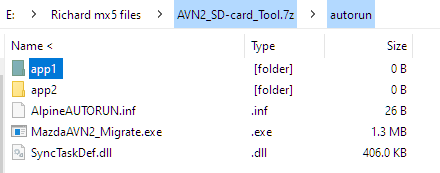
This is where it gets scary as once you start there is no going back after step 4 !!
-
Turn the ignition switch fully off. Put the microSD card in its slot behind the left-hand switch panel and reinsert the switch panel.
-
Turn the ignition key to the accessory position, switch the radio on and select navigation.
-
It will access the card and give you a big warning as to whether you want to proceed or not. Do so at your peril and I take no responsibility for anything that may go awry!!!
-
If you’ve taken a deep breath and pressed “Yes” or its equivalent, it will move the navigation software to the SD card in a very leasurely manner - about 30 minutes or so.
-
Once this update has finished and the Sat nav software has restarted, try using the sat nav software to go to a place. This is to check that you still have the on-screen virtual QWERTY keyboard.
You can then turn the ignition switch off and remove the SD card. -
Put the SD card into your PC and then execute the NaviExtras software you’ve downloaded.
The SD card will need to be replaced in the radio unit after you’ve completed the NaviExtras process.
Hope this is reasonably understandable. If not, then please get back to me.
Laurie
2 Likes
Thanks for your help, I really appreciate it. In the end I decided not to take any risks and leave it as is. I’m frankly appalled at the quality here. In trying to do the updates I followed the instructions and downloaded toolboxes from both Noviextras and Mazda, neither of which worked when I followed their instructions.
I’m pretty sure you’ve made the right decision, especially if it is only the navigation you wanted to update. Mazda UK has made zero effort in supporting owners of NCs and other cars in the range who wish to purchase map upgrades. A few people I know in this situation have either purchased a new Apple Carplay/Android Auto unit or just use Google Maps or the like on their phone.
Laurie
1 Like
That’s the best advice from benfieldi, dump it and install an Apple CarPlay/Android unit.
My experience was exactly the same as yours albeit mine was a 2013 with the Sanyo NVA-SD8110 which used TomTom maps.
I did actually spend a good 18 months trying to get TomTom’s/Mazda’s help, but gave up in the end.
Both function/upgrade in a similar way and both rubbish (in my opinion of course).
As Robbie states the current maps are just far too large in capacity for the SD card to update.
Both units were an after thought bodge into the car as a last run, (you will see why if you upgrade by the wire install etc).
Christmas is coming and treat yourself!
1 Like
I might just do that. Thanks for the advice.
1 Like
Okay I’m giving up and getting a different GPS. Can anyone suggest one that can be installed in the same place as the old one, or do I need to stick it to my windscreen (ugh)
Are you talking about the GPS aerial or the DAB antenna?
I’m talking about the GPS itself. Can I get one that slots into the dashboard in the same place as the current one?
Roger that.
I had the same problem.
On mine the original GPS was stuck on top of the unit.
I didn’t want to put it back there.
Likewise, I didn’t want it stuck on the windscreen.
But it had to go somewhere.
So as the central dash speaker mount had no speaker, I fabricated a thin piece of metal and stuck it down onto the grill (after flattening the original grill). Sprayed it Matt black and stuck the GPS on that.
Just wanted to get the best possible reception.
Just an idea.

PS The disc is to mount my Garmin satnav on for when I use pre planned routes on tours.
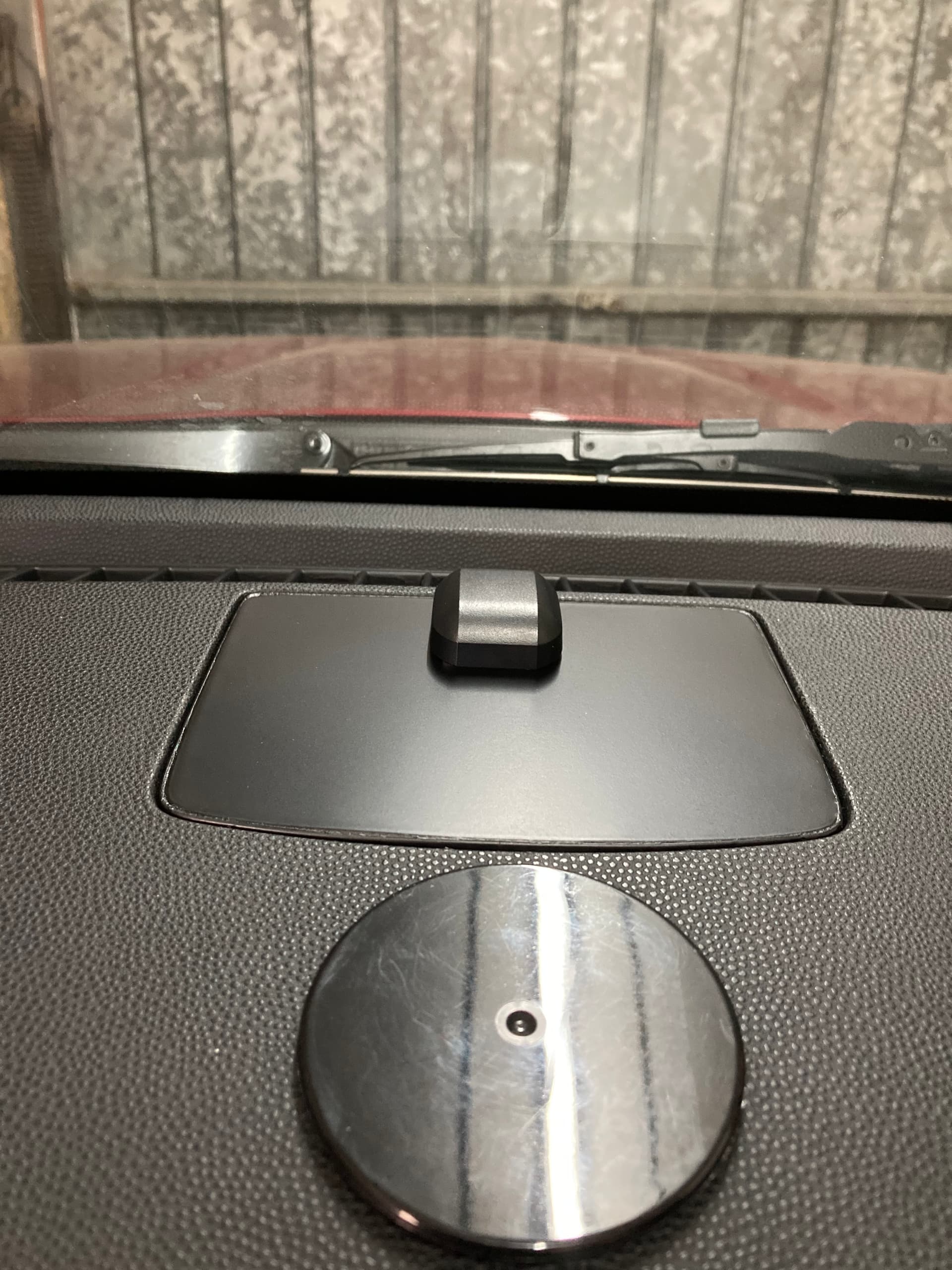

Wow, nice work. A bit beyond me unfortunately but thanks a lot for sharing.
You don’t have to put the metal plate in? (I just did because I could).
Just tease the grill out and make a small (the width of the wire) notch at the front to feed the wire through.
Feed the GPS model up through from the back of the unit and click the speaker grill back in place.
Then attach the GPS module to that.
Nice thinking and if it works👍
You can definitely get an head unit that does just about everything you’re likely to want, navigation, music phone calls etc…
For instance you will need to hook your phone up to the unit (when fitted) via the units Android auto or Carplay to get the navigation side up and running. This means a flylead being attached between head unit and phone, I situate my phone in the centre console and lead tucks away under the console so it’s not visible.
Realistically you are probably talking £300 + for the head unit and a ball park figure of £100 for the fitting kit and associated leads, antenna etc to get it fitted. Then add fitting costs if you don’t DIY it.
I’m just guesstimating prices here, it’s been a while since I installed my set up, you know how prices have gone silly and probably availablity too over the past 2-3 years.
It could be cheaper to try and get your present one up and running but I have read about how troublesome they can be.